Saturday, July 9, 2011

Saturday, May 28, 2011
Metyrapone blocks cortisol synthesis. This stimulates ACTH secretion, which increases plasma 11-deoxycortisol levels. http://goo.gl/1g9SR
"We know that (cortisol) is important for memory," - Marie-France Marin - http://goo.gl/JTwFd
Monday, February 21, 2011
TwitterBar, Ok now I will Tweet regularly and impulsively
TwitterBar, an extension for Firefox and Google Chrome that allows you to post tweets from the address bar in Firefox or a very simple dialog box in Google Chrome. I have screen shots of how this is done is Google Chrome because in the Firefox version is so simple it needs no instructions, not that the Google Chrome version is complicated or anything.
Either way here is a link to the browser extensions:
Firefox:
https://addons.mozilla.org/en-US/firefox/addon/twitterbar/
Google Chrome:
https://chrome.google.com/webstore/detail/pbadgdglepgngpoeijdgicjccomadekm
Some of the nice features these extensions offer:


Either way here is a link to the browser extensions:
Firefox:
https://addons.mozilla.org/en-US/firefox/addon/twitterbar/
Google Chrome:
https://chrome.google.com/webstore/detail/pbadgdglepgngpoeijdgicjccomadekm
Some of the nice features these extensions offer:
- Tweet includes a link to what ever page is open in your browser
- Automatic URL shortener using using is.gd
- Easy to post links without leaving your current browser window
Here is what it looks like in my Google Chrome browser (I have a theme and a few other add-ons)

Click the little bluebird to the right of the address bar

Then in the dialog type your tweet,
at the right it tells you how many characters left
Then click the bluebird and you have posted to twitter!
Saturday, February 6, 2010
HootSuite, taking the tedium out of twitter
I have come to the realization that twitter is not going away any time soon and that businesses can benefit from incorporating it with their existing marketing strategies. Actually spending time on twitter, posting new tweets and listening to what is being said is some what tedious, or at least compared with HootSuite. With HootSuite you can schedule a whole week worth of tweets in a few minutes, it really is an amazing service.

Check it out!
HootSuite

Check it out!
HootSuite
Thursday, January 28, 2010
Songbird, The Music Player That Rocks My World

Get Songbird!
I have used a wide variety of programs to play music, Songbird is by far the best music player. I have been using different music players since 1996 on computer, I have finally found one that truly makes me happy! Songbird does the following (internet connection required)
- Automatically downloads album art so you can see what your listening to
- Automatically downloads the lyrics of the song you are playing
- Can display photographs from the web of currently playing artist
- Alert you when artist in library will be playing a concert near you
- Last.fm
- Very fast music library, I have a large music collection and Songbird is still pretty fast for me
- Supports a variety of add-on to include additional features, think Firefox
- Web browsing integrated into play, you can actually browse the web from this music player
Download Songbird
Download Songbird Portable

Friday, May 1, 2009
Ad Free Internet Surfing
The internet has become a vile and toxic waste land of Ads that want to make us feel bad about ourselves so that we will buy what they are selling in the hopes it will aleveate some of the bad.
Here is a way to remove the ads from your browsing expirience.
First, if you don't have Firefox, download and install it, it is pretty straight forward of a process.
Click on any of the images to see a larger version of them.
Step 1.
Start Firefox. When it loads Click on Tools on the menu bar, then click Add-ons.

Step 2.
The Add-ons window will open. Click the picture of the box with the green arrow
that says "Get Add-ons", Then in the text box below that type "AdBlock Plus".

Step 3.
After a few seconds you should see something that looks like the picture below.
Down and to the right of the stop sign there is a button that says "Add to Firefox..."
click that button.

Step 4.
The following window should appear. After 3 Seconds have past you will be
able to click "Install", do so.


Step 5.
After a few seconds have past the Add-ons window should look like the
one in the image below, this time it will have a button that says
"Restart Firefox", click that button. After doing so Firefox will close and
re-open.

Step 6.
When Firefox starts back up it will open a page similar to the one pictured below.
On this page click the little circle to the left of "EasyList(USA)", then click the "Subscribe" button at the lower right corner of the page. This subscribes you to a
list of ad definitions that is constantly update, this is similar to the way your antivirus program gets updates about new virus.

Complete!
Congratulations you have successfully installed AdBlock Plus, This will be subtile at first but after a few days of using it you will notice that your additude about that internet has improved a bit.
The Pirate Bay - Before

The Pirate Bay - After

Google Search - Before

Google Search - After

YouTube - Before

YouTube - After

Here is a way to remove the ads from your browsing expirience.
First, if you don't have Firefox, download and install it, it is pretty straight forward of a process.
Click on any of the images to see a larger version of them.
Step 1.
Start Firefox. When it loads Click on Tools on the menu bar, then click Add-ons.
Step 2.
The Add-ons window will open. Click the picture of the box with the green arrow
that says "Get Add-ons", Then in the text box below that type "AdBlock Plus".
Step 3.
After a few seconds you should see something that looks like the picture below.
Down and to the right of the stop sign there is a button that says "Add to Firefox..."
click that button.
Step 4.
The following window should appear. After 3 Seconds have past you will be
able to click "Install", do so.
Step 5.
After a few seconds have past the Add-ons window should look like the
one in the image below, this time it will have a button that says
"Restart Firefox", click that button. After doing so Firefox will close and
re-open.
Step 6.
When Firefox starts back up it will open a page similar to the one pictured below.
On this page click the little circle to the left of "EasyList(USA)", then click the "Subscribe" button at the lower right corner of the page. This subscribes you to a
list of ad definitions that is constantly update, this is similar to the way your antivirus program gets updates about new virus.
Complete!
Congratulations you have successfully installed AdBlock Plus, This will be subtile at first but after a few days of using it you will notice that your additude about that internet has improved a bit.
The Pirate Bay - Before
The Pirate Bay - After
Google Search - Before
Google Search - After
YouTube - Before
YouTube - After
Tuesday, January 20, 2009
Free RSVP to Excel Spreadsheet with Google Docs
I recently was tasked with locating a free RSVP service for my office to use for an upcoming event. After googling it and investigating a few of the top results, I decided to attempt to use Google Docs to accomplish this task. With very little work I created a clean, minimalistic, ad free way of collecting RSVP information in a spreadsheet. Here I will provide a step-by-step guide for creating your own custom RSVP system using Google Docs. (For more information on how Google Docs works view this video)
Step 1. Get a Gmail account here.
Step 2. Google Docs.


Step 1. Get a Gmail account here.
Step 2. Google Docs.
- Goto docs.google.com/
- Sign in using your Gmail Account Username and Password
- Click New and select Spreadsheet from the drop down menu

- Click Form
- Click Create A Form

- After you click Create A Form the follow window will Open.

- In the field at the very top enter the name of the event for which people will be RSVPing
- In the field below that enter an explanation of what the user needs to do to RSVP, you can come back to this later. (NOTE: This is not set in stone, at anytime you can come back and make changes.)
- To edit a question click the pencil on the right hand side of the window. Click the pencil to the right of Name.
- You can now change this to First Name, and add help text if you would like. Help text allows you to explain to the user what you want them to enter for this question.
- Click the check box next to "Make this a required question", I highly recommend doing this to prevent people from submitting incomplete information. (NOTE: In some case it maybe wise to leave this uncheck if you feel the specific question is not relevant to everyone using the form, for the most part though you will want to use this option.)
- Click Done.
- Click Add Question

- When you click Add question the follow menu will appear.

- I will now quickly explain what each of these types of question is.
- Text
The user can type any thing they want in a single line. - Paragraph text
Same as text except this has multiple line that can be enter. - Multiple choice
This allows the user to select from several choices with radio buttons (circles with a dot in the selected one, user can choose only one). - Check boxes
Similar to multiple choice but the user can select more than one response. - Choose from a list
Similar to multiple choice except it is a drop down list instead of radio buttons. - Scale (1-n)
This question allows users to answer with a rate such as on a scale of 1 to 10
- Text
- For the purposes of this example select multiple choice.
- Fill out the information for this question in a way that suits your RSVP needs.

- Click Done.
- Now edit the message people recieve when the complete the form
- Click More actions and then click Edit conformation.

- In the windows that pops up you will be able to enter a personalize message that will appear when the user has filled out the form and clicked submit.
- Click the Save button at the top right of the screen.
- Close the window
- Open the window or tab in your browser that contains the Google docs spreadsheet

- The columns in the spreadsheet labels will be the same as the questions you enter in the form.

- To Preview the form click Form at the top of the spreadsheet.
- Then click Go to live form.
- This will show what your form will look like when you send it to others.
- To send your form to others click Embed form. . .
- Copy the link and past it in a e-mail to the people you wish to invite to your event.
- Login to Google Docs.
- Click on the check box beside the name of your spreadsheet.

- Then click more More Actions.

- Then click Save as Excel.
- Your spreadsheet should start downloading.


Friday, December 28, 2007
T3CH releases Xbox Media Center to PC

This is a picture of my laptop running Xbox Media Center (XBMC). T3CH released a new version of XBMC on December 23, 2007, it contains a basic Windows version XBMC, this release is intended for developers of skins and scripts for XBMC. This allows for testing with out having to upload files to the actual Xbox every time a change is made. This is only a partial port, it only supports basic audio play back (no videos, no visualizations, no games). This release is only compatible with some graphics cards, it works on my laptop but not on my desktop. T3CH has said that there are no plans of abandoning the Xbox.
Sunday, December 23, 2007

Thursday, December 13, 2007
Ice Storm 2007, Maryville Missouri
 I have taken a many of pictures of the ice, down trees, and snow from the recent ice storm, the whole collection is in my google photo album. Check it out!
Friday, December 7, 2007
One Note

Microsoft Onenote is an awesome note taking organizational tool. I used it too take notes in my Intro to philosophy class. I organized my notes after class. I don't know that I will really use this program even though I like it, I will probably just forget about it and and keep using Microsoft Word for note taking.
Scanning – OCR, Forms, Photo
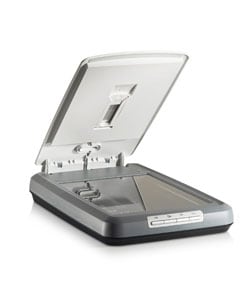
Scanning is pretty useful, you can take hard copy of images text and forms and turn it into a digital version that can be edited, posted on the internet, or in the case of forms filled out.
OCR( Optical Character Recognition) allows you to scan text from any hard copy source, magazines, letters, books, or reports. This is an extremely useful technology, you can take any thing that is printed and convert it to a text document.
Omni Form is a really cool program that allows you to scan a form and then fill it out on computer and then print it off. This allows you to fill out forms in an extremely neat and tidy manor.
Photo scanning is nice for many reason, you can save and manage your personal photos, you can edit images, and do a variety of other creative projects.
Adobe Acrobat PDF

Adobe Acrobat is great it lets you create Portable Document Format or PDF files. These files can be used on any platform; Windows, OSX, Linux, BeOS, and many more. Another benefit is that the size of the document is smaller than a typical Rich Text Format or Microsoft Word document. This makes PDF an excellent choice for documents that will be transmitted over the internet. Another advantage to these documents is that Acrobat Reader(the standard viewer) cannot edit them, so when someone is viewing the document that is all they can do, they can not edit it. Adobe Acrobat 7.0 Professional allows you to create original documents as well as convert existing one. You should note that if you are planning on obtaining this software plan on spending at least $135, Adobe products are not cheap. How ever if you only wish to convert existing documents, here is a website that will do it for free. Doc2PDF Online. You simply upload the Microsoft Word or Rich Text Format document you wish to convert and enter you e-mail address(spam free), then in a few minutes a PDF version of your document is e-mailed to you. I personally with use this website more than I will use Adobe Acrobat 7.0 Professional.
10-Key


This was fun. My data entry speed has at least doubled. I use Keyboarding Pro Multimedia to improve my 10 key skill. This program was fun and interactive, it also gave me helpful reports at the end of each section. I can see many applications of this skill, professional it has many uses, many different fields involve data entry and being able to key quickly would help with any data regardless of it's nature. One personal use I can think of is computer games, some computer games have controls that can be customized and if you set your controls to the number pad you could me effectively navigate and play computer games. This kind of material is more what I think of when I think of a business or keyboarding class, doing this lessons was an "oldie but a goody".
Gateway Tablet PC

This is a nice device. I am glad it is a convertible and not strictly a Tablet. A Convertible Tablet PC has a keyboard as well as a Stylus. You can tap on the On Screen Keyboard, or you can use the real key board. I feel that this is a very versatile device with many possible uses.
I think it's main advantage over a normal laptop is the note taking capacity. I also think it is fun to navigate with the stylus instead of the mouse. I had become board using a mouse, and even the touch bad had lost its luster. I can't think of a single reason not to buy one of these great computers, they are really a blast to use and have no draw backs that I can think of.
Gateway Tablet PC A+
Thursday, December 6, 2007
The Dell Axim

This device is amazing, it has Windows Mobile on, a pretty cool operating system. This device does almost every thing a computer does. The interface is great! I really like the desktop it is very organized and useful. The key board that came with works well too, it takes a little getting used to but after that it is same a normal keyboard and its tiny and goes anywhere.
The Dell Axim allows you to prepare documents any where with Microsoft Word Mobile. There is also a PDF viewer available here. The Axim also can connect to wireless networks. Additional it has inferred and bluetooth capabilities. If I had the funds I would own one!
Wacom Handwriting Tablet

(For better or for worse)
This is a cool device, I welcome the additional method of input. First off I think it is worth saying that on the campus of Northwest Missouri State University the Wacom Handwriting Tablet had some problems, software problems. Half way through the semester the use of Handwriting Tablet was scrapped, this was due to a software problem that could not be resolved. I have located a possible fix in the for this problem, visit this website for a possible solution to this problem, it appears to have to do with a Windows XP update.
I like the tablet, it is fun to draw with but the handwriting recognition is not as fun. For me it goes back to the fact I don't like to write, I like to type. However I do like to draw. I don't know that I would ever use this in an office environment but I would definitely use it at home to draw with. Over all I think this is a pretty cool device, if I had the funds I would buy one.
Hand writing recognition
This is a technology I personally will not be using much, that is because my writing skills are not great, additionally this technology is built to recognize cursive handwriting, I print. Having said that I am impressed with its ability to recognize my handwriting, seriously my handwriting is bad, and with the exceptions of "N", "M", and "F" it recognized about 90% of what I wrote.
I can't think of a situation where I would use handwriting over a keyboard or other input devices. I really dislike handwriting to be honest, thats one of the many reasons I love computers, they don't care how well I can write.
I can't think of a situation where I would use handwriting over a keyboard or other input devices. I really dislike handwriting to be honest, thats one of the many reasons I love computers, they don't care how well I can write.
Monday, November 26, 2007
Machine Transcription
This is an interesting subject for me, I have always heard the ads on TV about get trained to enter the field of medical transcription, but I really did not understand what that was about. Have transcribed a few letter and had some of the ins and outs of it explained to me I understand the value of machine transcription.
Machine transcription requires a few basic materials:
Here is a link to a youtube video of an old transcription machine
I don't know that I am looking for a career in transcription but I am very glad to have this skill.
I think it is worth know, and not yet out-dated by technologies like speech recognition, maybe next year?
Machine transcription requires a few basic materials:
- A Recording device
- A Playback device
- A means of controlling the play back (ie. a pedal)
- A device to enter the data on
- A person dictates what they want to have transcribed into the recording device
- They use keywords to indicate where new paragraphs begin such as "new paragraph" also names are spelled out so there is no confusion.
- A person sits at a computer or typewriter and listens to the recorded dictation with a means of easily rewinding and fast-forwarding the recorded dictation. Then they type the letter (or other materials), fix grammar errors and other suitable changes to the material transcription is not verbatim.
Here is a link to a youtube video of an old transcription machine
I don't know that I am looking for a career in transcription but I am very glad to have this skill.
I think it is worth know, and not yet out-dated by technologies like speech recognition, maybe next year?
Subscribe to:
Posts (Atom)
